Tango platforms include several default roles, such as Admin, Sender, Standard, Support, and Support Lead. Default roles are a predefined set of roles and permissions provided by Tango that cannot be modified, renamed, or deleted. They are useful to quickly assign common responsibilities without configuring permissions manually. See Roles and permissions in Tango for more details.
Why use default user roles?
Default user roles are pre‑built, trusted permission sets by the system that cover the most common workflows without requiring you to design security from scratch. They:
-
Cover common scenarios, such as user admin and reward sender.
-
Cannot be edited, renamed, or deleted.
-
Define what users can see and do in the platform (for example, manage users, place orders, view reports).
-
Are ideal for quickly assigning standard responsibilities without manually configuring permissions.
To create specific roles from scratch with exact permissions, use custom roles. See Manage custom user roles in Tango. To adjust default roles for your use case, you must first duplicate it. The duplicate is named “Custom” that you fully control. See the instructions below.
Required permissions
You must have Entire organization access and Manage roles permission to create custom roles, duplicate default roles, edit, rename, or delete roles, and assign roles to users. See Roles and permissions in Tango.
Users with Select accounts and groups access cannot create, duplicate, or modify roles, even if Manage roles is assigned.
Use case
At Acme Health, the platform admin needs a temporary role similar to the Standard default role but with a few tighter controls for the Care Coordination team. Because default roles in Tango cannot be edited, renamed, or deleted, the admin duplicates the Standard default role to preserve the original Tango‑defined permissions. The duplicate is now editable and can be customized to remove high‑risk actions, such as exporting sensitive data or approving high‑value rewards, without altering or depending on the built‑in role. This allows Acme Health to preserve the original default role's integrity while enabling fulfillment of this temporary role.
Best practices:
-
Assign default roles when they meet your needs without modification.
-
Create custom roles only when business needs require deviations. See Manage custom user roles in Tango.
-
Minimize the number of duplicate defaults.
-
Rename the duplicate defaults clearly, review and clean them up regularly.
Duplicate default roles
Default roles act as your “source of truth.” By duplicating a default role, you keep the main role untouched while modifying permissions for your exact needs. When you change any duplicated default role, the system treats it as a Custom version of the default role. This custom version is your editable copy and is fully controlled by you.
To duplicate a default role:
-
Sign in to the Tango portal.
-
Click Users on the left menu.
-
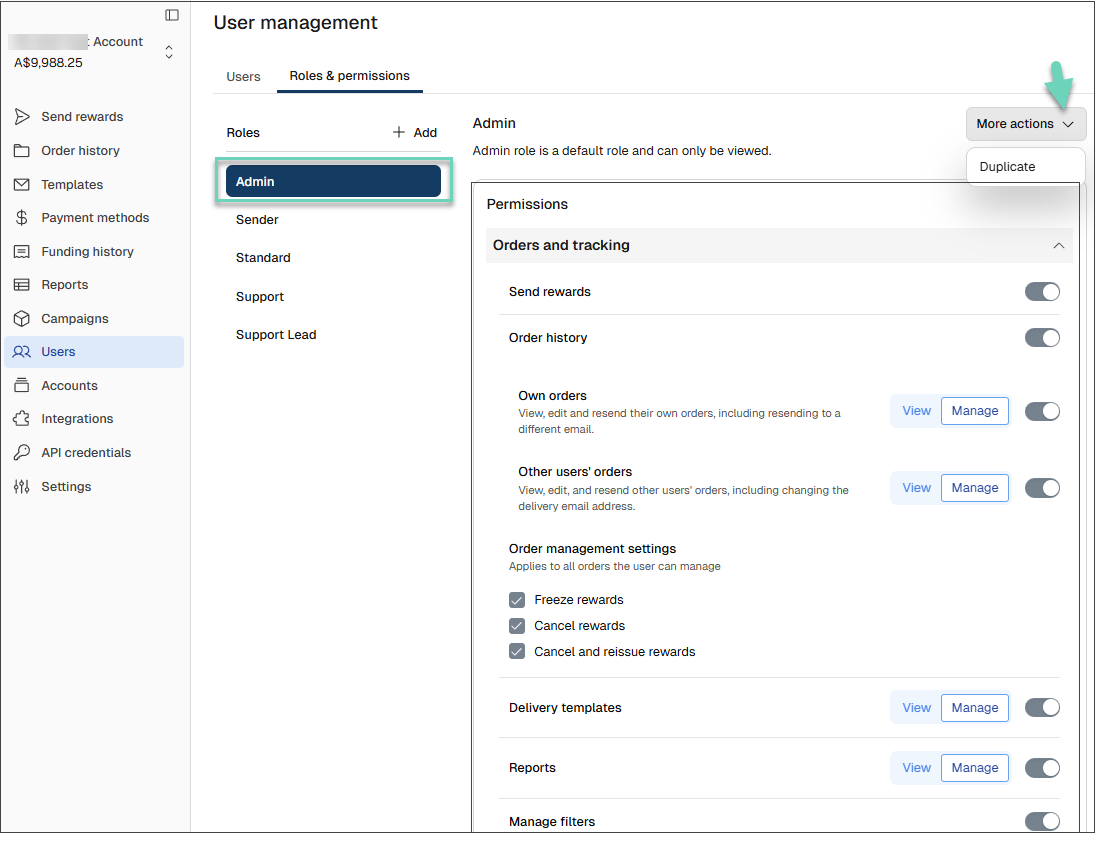
Click Roles & permissions. Default roles are listed on top of the list. They cannot be modified or deleted.
-
Select a default role then click More actions on the top right.
-
Click Duplicate.
-
Enter a Role name and click Create role.
-
Modify permissions as needed for your duplicated role, then click Save changes.
Your duplicated role now appears under Roles & permissions and is ready to assign to users. You can rename, duplicate, or delete this duplicated role.
Rename, duplicate, or delete duplicated default roles
Duplicated default roles are fully controlled by you. You can change their permissions, rename, duplicate them again, or delete them when they are no longer needed.
To rename or delete a duplicated default role:
-
Sign in to the Tango portal.
-
Click Users on the left menu.
-
Click Roles & permissions. Default roles are listed on top of the list. They cannot be modified or deleted.
-
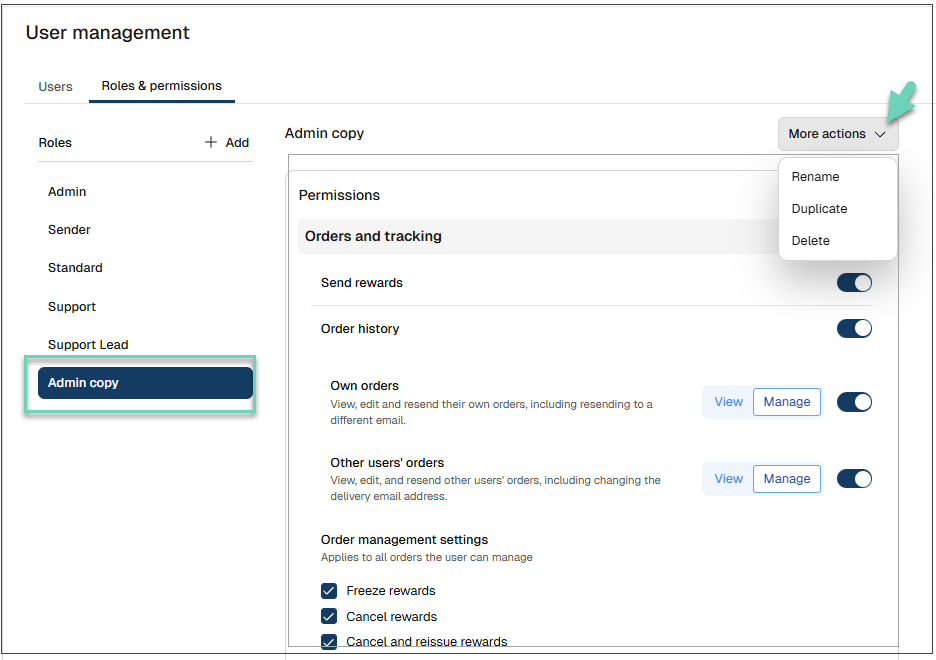
Select a duplicated role you want to change, then click More actions in the top‑right corner.
-
Click Rename, Duplicate, or Delete, and complete the prompts.
View default roles
Default roles and their duplicated versions are listed under Users > Roles & permissions.
More resources: