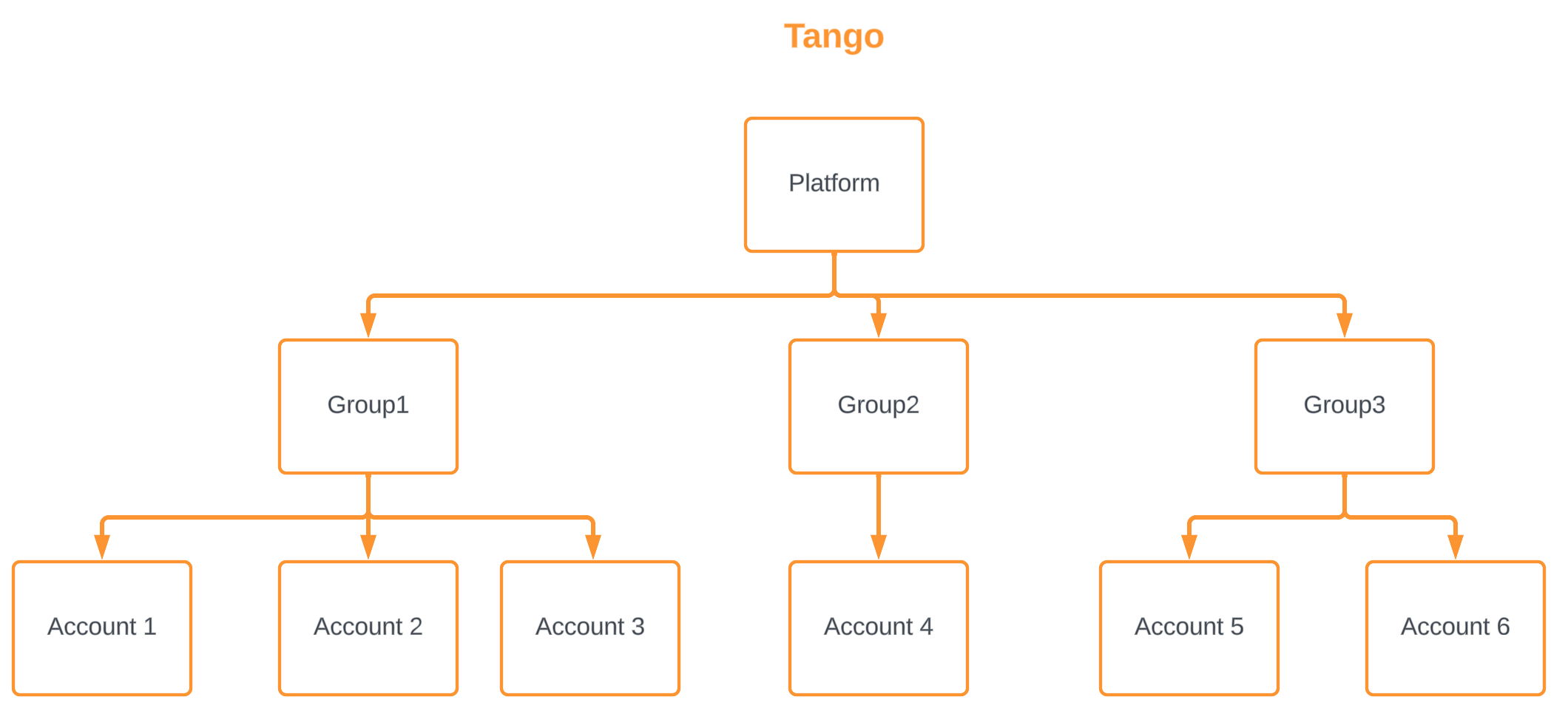
Tango is organized in three tiers: platform, groups, and accounts. Tango platform is the topmost layer. You can only access one platform at a time, whether your organization is complex or simple. Admins with Organization Access can manage groups and accounts:
- Groups are the second level under the platform. Each group contains one or more accounts. At least one group exists on each platform and may have the same name as the platform. Groups cannot be deleted or disabled.
- Accounts are nested within groups and they contain funds. All transactions including adding funds or sending rewards are managed at the account level. If you want to keep funds separate for different programs (for example, an employee-incentive program vs. a customer-referral program, we recommend using different accounts. An account can be active or disabled.
Accounts use cases
Your marketing department in your business currently runs two programs: an employee-incentive program and a customer-referral program. You want to keep the funds separate for each program per your accounting requirement. You create two separate accounts on your platform: one for the employee-incentive program and one for the customer-referral program. Each account contains the funds dedicated to the program. You can get details such as name, account number, account identifier, the status of the account, etc. from the account.
Groups use cases
Check the following examples:
- Enterprises: In ABC enterprise, all departments or divisions have their own groups. The manager of each department or division has control over all accounts in their department. They can create multiple accounts for teams, projects, budgets, or anything that needs funds tracked separately. They can also create groups for accounts that require a controlled access; for example, team A has a separate group than team B since the two teams do not need access to each other's account.
- Small Companies: In an small company, groups are set up by:
- Accounts—such as Internal programs, sales initiatives, and employee moral.
- Customer programs—such as loyalty accounts, or referral accounts.
- Platform customer with sub customers—in platform customers, each customer has their own group; sub customers can have multiple projects or budgets with the platform customer depending on their budget needs.
What’s next?
-
To learn how to create a new Tango account, add it to an existing group, or create a new group during account setup, see Create Accounts and Groups .
-
To learn how to disable or enable accounts and rename groups after they are created, see Manage accounts and groups in Tango.
-
To find where your Tango account number appears in the portal and when you may need it for support or account management, see Find your Tango account number.
-
To locate account and customer identifiers when you need to reference groups or accounts through the Tango API, see Find account and customer identifiers for API use.
-
To set up and manage low-balance notifications so your team knows when account funds need attention, see Create account balance alerts.
-
To review common questions about users, accounts, groups, permissions, and platform access, see Users and accounts FAQ.
More resources: