Tango is a rewards and incentives platform. It integrates with a wide range of business tools to automate and streamline digital rewards and incentives. The Tango API enables seamless integration between your application and Tango, allowing you to connect with platforms like Salesforce, Qualtrics, etc. To fully leverage its capabilities, you need to integrate the API into your system to unlock the complete feature set.
Here are some Tango integrations platforms:
-
Survey & Research: Such as Qualtrics, SurveyMonkey, and Forsta
-
Marketing & CRM: Such as HubSpot, Salesforce, and Marketo
-
Employee engagement: Such as Slack, Namely, and Microsoft Teams
-
Integration tools: Such as Workato and Zapier
What’s needed?
To integrate with Tango you need:
Required permissions
-
You must have the Entire organization access to manage integrations and API credentials.
-
For Qualtrics-specific integrations, View or Manage permissions are required depending on the level of control needed.
See Roles and permissions in Tango.
Manage your integrations
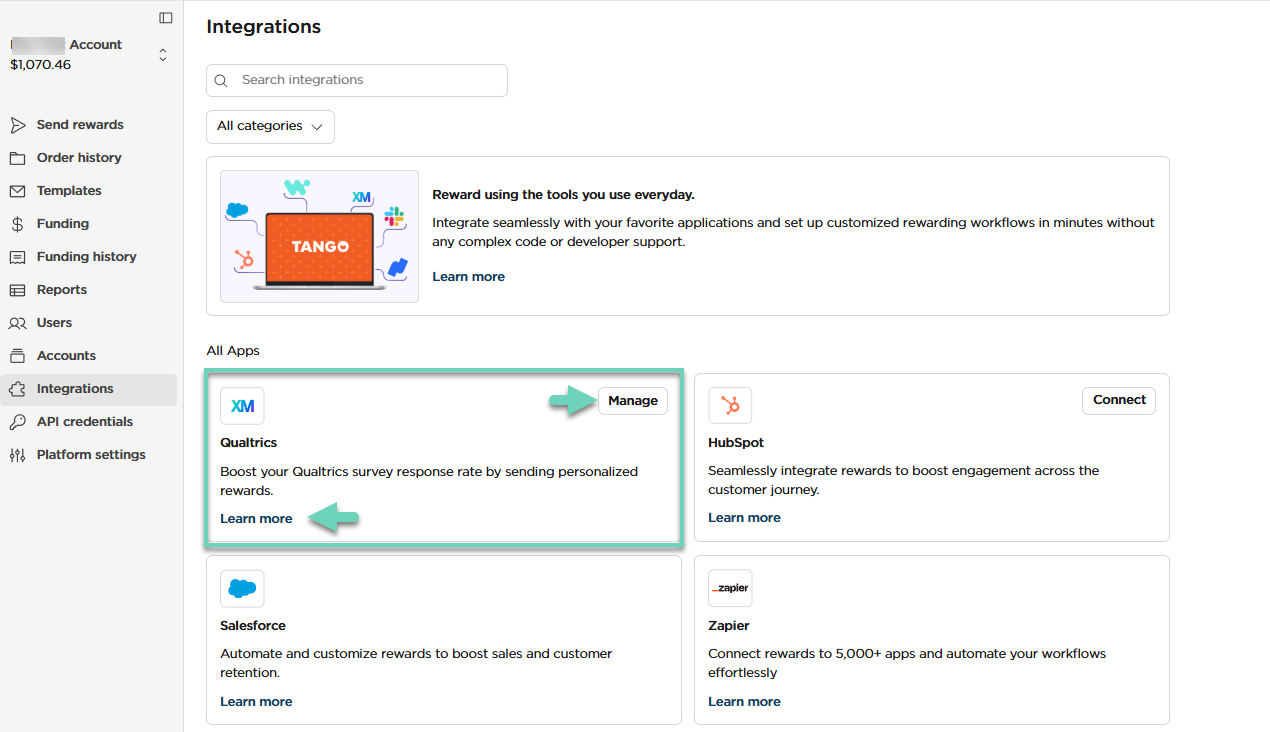
Your third-party integration app, such as Qualtrics, is listed on this page. To manage your integration such as Qualtrics, Salesforce, etc. follow the instructions below:
To manage integrations:
-
Sign in to the Tango portal.
-
Click Integrations from the left menu.
-
Locate or search for the integration app such as “Qualtrics”.
-
Click Manage to open the dashboard for more capabilities.
-
Click Learn More to open more information such as https://www.tangocard.com/qualtrics.
More resources: